
Securing admission into a Nigerian tertiary institution, whether a federal university, state university, private university, polytechnic, or college of education, involves a dual-verification ecosystem. Candidates must track their application through two complementary portals: the JAMB Central Admissions Processing System (CAPS) and their chosen institution's official screening portal.
Understanding how these two platforms interact, what each status notification means, and the critical post-admission deadlines is vital to preventing accidental forfeiture of your admission slot. This master guide explains everything you need to know for the 2026/2027 session.
How to Check Admission Status in Nigeria: JAMB CAPS and School Portal Explained — Quick Reference Summary
Guide Scope: National Blueprint for Tertiary Admissions in Nigeria
Administering Authority: Joint Admissions and Matriculation Board (JAMB) & Tertiary Institutions
Primary National Portal: JAMB CAPS (efacility.jamb.gov.ng)
Institutional Portals: Individual University / Polytechnic / College Admission Checkers
Key Status Stages: Not Admitted, Recommended, Admission in Progress (AIP), Offered Admission, Transferred
Mandatory Post-Admission Step: CAPS Acceptance within 72 Hours & Original JAMB Letter Printing
Table of Contents 10 sectionsShowHide
- The Dual-Portal Admission Framework in Nigeria
- Deciphering JAMB CAPS Admission Status Messages
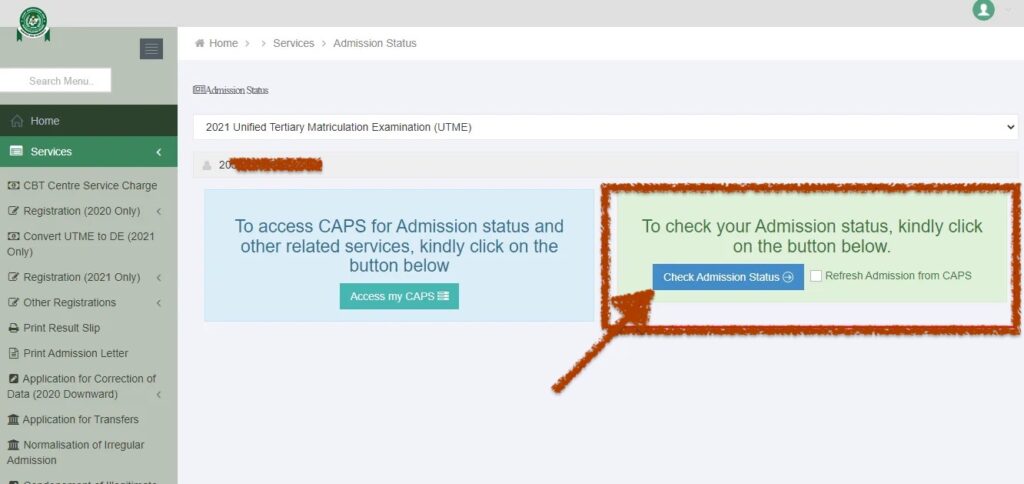
- Step-by-Step Guide: How to Check Admission Status on JAMB CAPS
- The Post-Admission Roadmap: 6 Essential Steps
- Official Document Verification Dossier Checklist
- Troubleshooting Portal Login Errors and Administrative Support
- Important Academic Deadlines and Registration Protocol
- Conclusion
- Get Real-Time Admission & Screening Alerts
- Frequently Asked Questions (FAQs)
The Dual-Portal Admission Framework in Nigeria
In Nigeria, undergraduate admissions are processed through an interconnected two-tier workflow:
- Tier 1: Institutional Screening Portal: The university or polytechnic evaluates your Post-UTME performance, compiles merit/catchment lists, and uploads recommended candidates to JAMB central database.
- Tier 2: JAMB CAPS (Central Admissions Processing System): JAMB verifies that recommended candidates satisfy national minimum benchmarks and approves the offer for formal acceptance.
- Key Rule: An admission offer is only 100% legally binding and complete when it appears and is accepted on JAMB CAPS.
Deciphering JAMB CAPS Admission Status Messages
When monitoring your CAPS dashboard, your profile will display one of five standard status notifications:
- Not Admitted: Your application has not yet been processed or recommended by your institution. This is normal during early admission phases.
- Recommended: Your chosen institution has forwarded your profile to JAMB for final desk officer verification.
- Admission in Progress (AIP): JAMB is finalizing the approval of your recommendation. Your offer will transition to 'Admitted' shortly.
- Congratulations, You Have Been Offered Admission: Your admission is officially approved. You must click ACCEPT within 72 hours.
- Transfer Approval: Your institution has proposed a transfer to an alternative course. You must click Accept Transfer before the new offer can be finalized.
Step-by-Step Guide: How to Check Admission Status on JAMB CAPS
Follow these steps to check your national admission status:
- Visit efacility.jamb.gov.ng and log in with your registered email and password.
- Switch your mobile browser to Desktop Site view.
- Click on Check Admission Status.
- Select the examination year (2026) and enter your JAMB Registration Number.
- Click on Access My CAPS.
- On the left navigation bar, click on Admission Status.
- Review your status. If an offer is displayed, click the green ACCEPT button.
The Post-Admission Roadmap: 6 Essential Steps
Once you accept your admission on JAMB CAPS, follow this roadmap to secure your student enrollment:
- Print Original JAMB Documents: Generate your colored JAMB Admission Letter and JAMB Result Slip from the e-facility portal.
- Pay Institutional Acceptance Fee: Log in to your university/polytechnic portal and pay the non-refundable acceptance fee via Remita.
- Complete Online Clearance: Upload digital copies of O'Level results, birth certificates, and indigene letters on the school e-clearance platform.
- Physical Screening: Report to the campus admissions office with original credentials and photocopy file jackets.
- Pay Tuition / School Fees: Generate and pay your approved departmental school fees schedule.
- Course Registration & Matriculation: Register for 100-Level/200-Level semester courses and participate in the official matriculation oath-taking ceremony.
Official Document Verification Dossier Checklist
During both institutional online e-clearance and on-campus physical verification, admitted students must present an organized screening file containing the following mandatory credentials:
- JAMB Documentation: Original JAMB Admission Letter (Institution & Candidate copies printed in full color) and Original JAMB Result Slip featuring your clear biometric passport photograph.
- Academic Qualifications: Official O'Level Certificates or Statement of Results (WAEC, NECO, or NABTEB) accompanied by active online verification scratch card pins.
- Identity & Indigeneship: Certificate of State and Local Government of Origin signed by your Local Government Council Chairman or authorized liaison officer.
- Age Verification: Original National Population Commission (NPC) Birth Certificate or a valid Statutory Declaration of Age.
- Financial Evidence: Verified e-receipts for Post-UTME screening, non-refundable institutional acceptance fees, and faculty development levies.
- Health & Conduct: Comprehensive Medical Fitness Certificate from the University Health Centre and a formal Letter of Attestation/Good Conduct signed by a reputable community leader, cleric, or legal practitioner.
- Photographs: Eight (8) recent colored passport-sized photographs on a plain background with your full name written on the reverse side.
Troubleshooting Portal Login Errors and Administrative Support
Prospective students occasionally encounter portal access obstacles during high-traffic admission clearance windows. Below are verified solutions to common technical issues:
- 'Invalid Credentials' Error: Double-check that your JAMB Registration Number has no leading or trailing whitespace. If logging in with your surname, ensure correct case sensitivity as recorded on your screening slip.
- Password Reset Protocol: Use the Forgot Password link on the login dashboard. Enter your registered email to receive an automated password reset token. If you do not receive the email within 15 minutes, check your Spam/Junk folder.
- Payment Invoice Verification Delays: When paying via Remita or interswitch, network timeouts may delay immediate status updating. Click on the Re-query / Confirm Payment button on your student dashboard and enter your 12-digit RRR number to synchronize records instantly.
- Browser Compatibility: Access the portal using updated versions of Google Chrome, Mozilla Firefox, or Microsoft Edge. Always enable cookies and pop-up windows to allow PDF admission slips to render properly.
- Administrative Support Desk: For unresolved account lockouts, name corrections, or payment reconciliation, contact the Admissions Directorate or visit the University ICT Centre during official working hours (8:00 AM – 4:00 PM, Monday to Friday).
Important Academic Deadlines and Registration Protocol
Admitted candidates must strictly adhere to the published institutional academic calendar to prevent forfeiture of provisional offers:
- Acceptance Fee Deadline: Typically 2 to 3 weeks from the date of admission list publication. Failure to generate an invoice and complete payment forfeits your admission slot to supplementary candidates.
- JAMB CAPS Confirmation Window: Offers must be accepted within 72 hours of appearance on the CAPS dashboard to prevent automated system expiration.
- Faculty Dossier Submission: Submit your completed physical file jackets to your Faculty Officer before the close of the central screening window.
- Course Registration Deadline: Complete online semester course registration within two weeks of tuition payment to ensure your name appears on official examination attendance rosters.
- Orientation & Matriculation: Participation in the orientation week and formal matriculation ceremony is compulsory for all fresh undergraduate students.
Conclusion
Successfully securing admission and completing clearance for the 2026/2027 academic session requires prompt action, careful document preparation, and strict adherence to official institutional and JAMB deadlines. Monitor both your student portal and your central JAMB CAPS profile regularly, complete your fee payments and online screening within the allotted windows, and ensure all uploaded credentials match your identity records accurately.
Stay proactive throughout the screening season, keep physical and digital duplicates of all payment receipts and clearance forms, and prepare thoroughly for an enriching academic journey ahead.
Get Real-Time Admission & Screening Alerts
Join over 65,000 Nigerian students receiving verified departmental cut-off drops, JAMB CAPS batch announcements, and post-UTME screening notices directly on WhatsApp.
Join SchoolGateHub WhatsApp Channel
Frequently Asked Questions
Quick answers to common questions about this guide
1What should I do if my school portal shows admitted but JAMB CAPS shows Not Admitted?
JAMB CAPS often takes a few days to synchronize with institutional recommendations. Trust that your recommendation is in transit and keep checking CAPS daily.
2How long do I have to accept my admission on JAMB CAPS?
Candidates have 72 hours (3 days) from the date of offer notification to click ACCEPT before the offer risks automated expiration.
3Can I reject an admission offer on JAMB CAPS?
Yes, clicking REJECT declines the offer and makes your profile available for consideration by other institutions or supplementary lists.
4What is Transfer Approval on JAMB CAPS?
Transfer Approval occurs when an institution offers you a course different from your original choice. You must accept the transfer on CAPS to receive the admission.
5Is an admission valid if I don't print my JAMB Admission Letter?
No. The JAMB Admission Letter is the only nationally recognized proof of tertiary admission required for NYSC mobilization, scholarships, and postgraduate studies.
Join Our Educational Updates Community
Get instant real-time alerts on scholarships, state bursaries, admission lists, and student opportunities.